How it works
Three steps, under a minute
 1
1Enter this morning's wake-up
Age once, then today's wake-up time and how many naps you're aiming for. NapBay lays out the nap windows and the bedtime window for the day.
 2
2Log the nap that actually happened
Fell asleep, woke up, how it went. 13:00 to 13:35 is a short nap, so the next wake window is already 30 minutes shorter and bedtime moves earlier. Everything re-plans from the real end of the nap, not from the clock.
 3
3Read one decision
HOLD THE PLAN, BRIDGE NAP or EARLY BEDTIME, CAP + EARLY BEDTIME: one sentence on what to do next, with the rule it comes from. No dashboard to decode.
The 32-minute nap
The nap lasted 32 minutes. Not 90.
And the whole day just fell over. You stand in the hallway doing wake-window maths in your head. Guess a bedtime. Guess wrong. By Thursday the whole day has drifted 90 minutes.
Every schedule you've ever downloaded has the same bug: it's anchored to the clock. “Nap 2 at 13:00.” Lovely. Except nap 1 ended at 12:10, and now the plan is fiction.
Then the paediatrician asks how often she was up last night. “Three times? Maybe four.”
You don't need a sixth method. You already picked one. What's missing is the arithmetic and the record-keeping that no method book ships with.
In parents' own words
- “I don't understand how to keep same times if nap times vary so much!”
- “her naps are so hit or miss, how can I keep a consistent bed time?”
- “whenever she's awake, I'm just watching the clock”
- “very short crib naps… how do you meet wake windows??”
- “I'm trying to keep accurate records for her sleep consultant, but I'm struggling with the logistics”
- “ready for longer wake windows, but not enough to drop to 3 naps?”
The Rescue Rules
Five rules. One decision a day.
This is the whole system on one page. Today's decision names one of these rules, so you always know why.
- Rule 1HOLD THE PLAN
Day sleep is inside the age target.
Do nothing clever. Offer the next nap inside the window the app shows. A day inside range does not need rescuing, even if it felt awful.
- Rule 2BRIDGE NAP or EARLY BEDTIME
Day sleep is more than 30 minutes short of target.
Next planned sleep more than 90 minutes away? Bridge nap: 15 to 25 minutes, capped, in the pram or car with you awake and watching. Never longer, never in the cot. Less than 90? Skip the bridge and use the earliest bedtime in the window. And no extra long nap after 16:30; it buys you a 21:00 bedtime.
- Rule 3CAP + EARLY BEDTIME
Two or more naps came in under 45 minutes.
Use the earliest time in the bedtime window and start the routine 30 minutes before it. Tomorrow, cap nap 1 at the typical length: a monster nap 1 is the most common reason nap 2 fails. Don't stretch wake windows to tire them out; overtired babies nap worse, not better.
- Rule 4CAP DAY SLEEP TOMORROW
Day sleep is more than 30 minutes over target.
Cap the last nap of the day first, by 15 minutes at a time, then nap 1 to the typical length. Over-target day sleep usually shows up as a 04:50 wake or a 1-hour party at 02:00, not as a hard bedtime.
- Rule 5THE SIGNAL THE APP CANNOT SEE
Three fought or refused naps in a row, or a nap that has become a 20-minute battle for two weeks.
That is a transition, not a bad week. Stop adjusting minutes and open the matching flowchart: four question trees, tick what is true, get one answer.
The three sentences to remember at 05:00
- Anchor from the last real sleep, not from the clock.
- Short nap, shorter next window, earlier bedtime. The app already did it.
- Change one thing, hold it five days.
For you, or not for you
NapBay is for you if
- Your baby is 3 to 18 months and you already run the day by wake windows.
- You're mid nap-transition (4 to 3, 3 to 2, 2 to 1) and can't tell if it's the transition or a bad week.
- One 32-minute nap turns the rest of your day into guesswork.
- Daycare naps by the clock and your home plan collide every daycare day.
- You're tracking night wakes for a paediatrician or a paid sleep consultant.
- You have twins and you're already running two schedules in a chat window.
Not for you if
- Your baby is under 3 months. Ask your clinician first. For babies born early, use corrected age.
- You want an opinion on CIO vs. gentle. NapBay takes no side, on purpose.
- You want a 40-feature tracker with community and push notifications.
- You're looking for a promise that your baby will sleep through. Nobody honest can make it.
- There's a medical concern: feeding, breathing, sudden changes. Read the safety page and call a professional today.
What Rescue unlocks
Log it, print it, fix the bad days
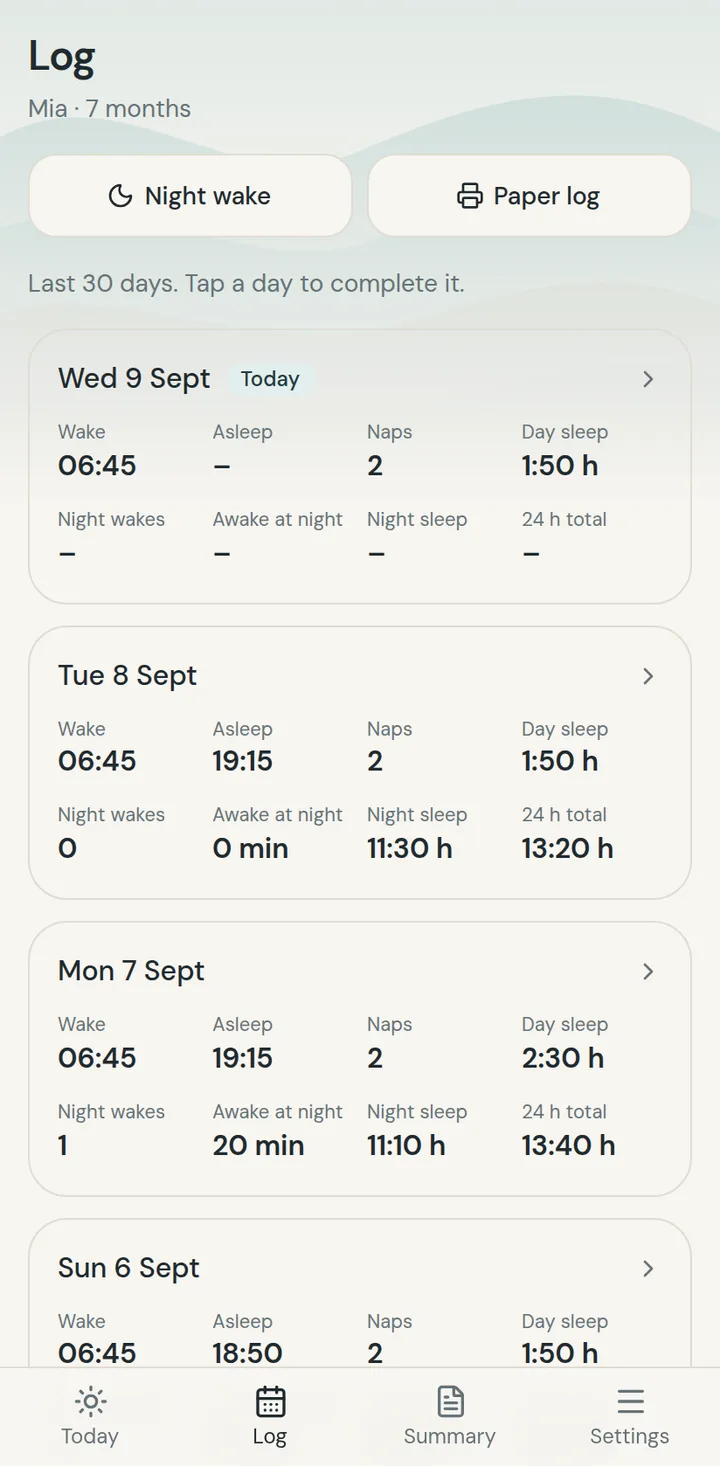
Log: naps, bedtime and night wakes, 30 days back.
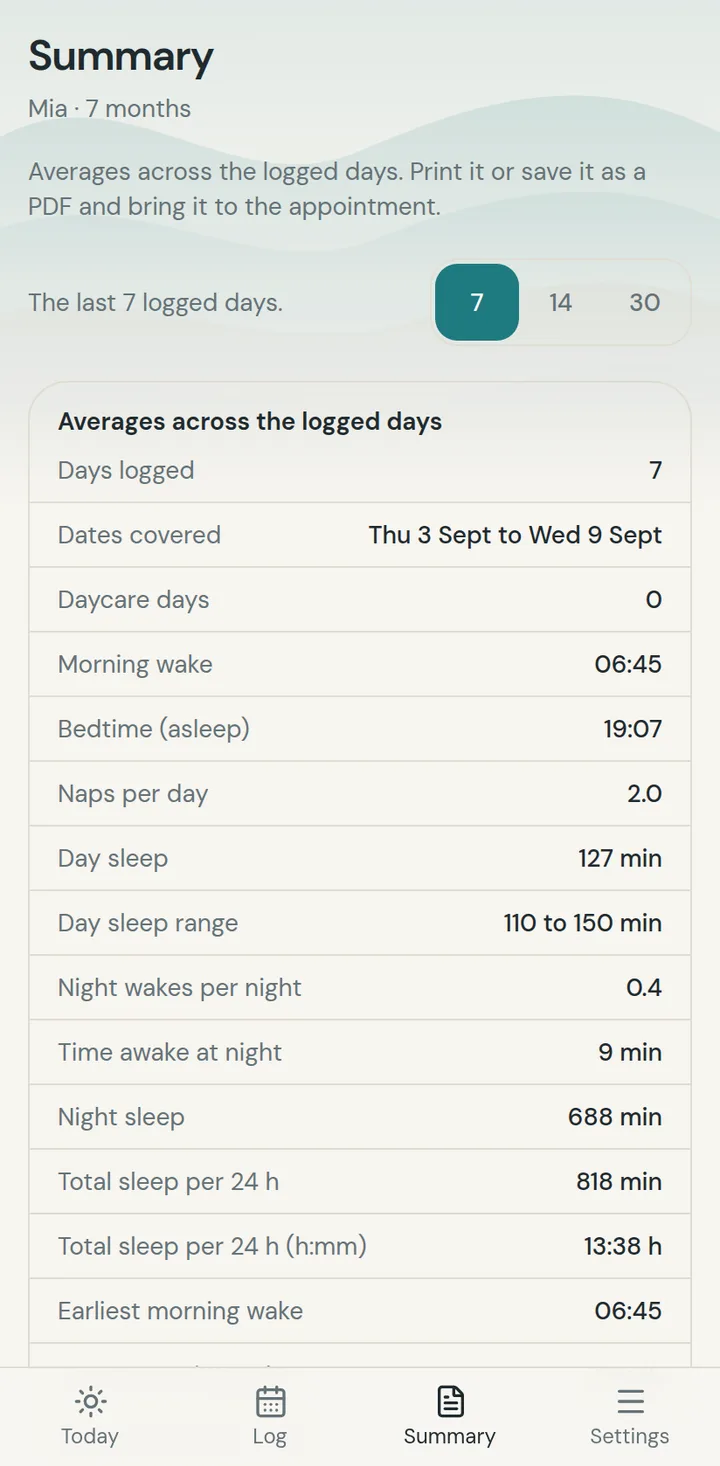
Summary: averages on one page. Print it or save it as a PDF for the appointment.
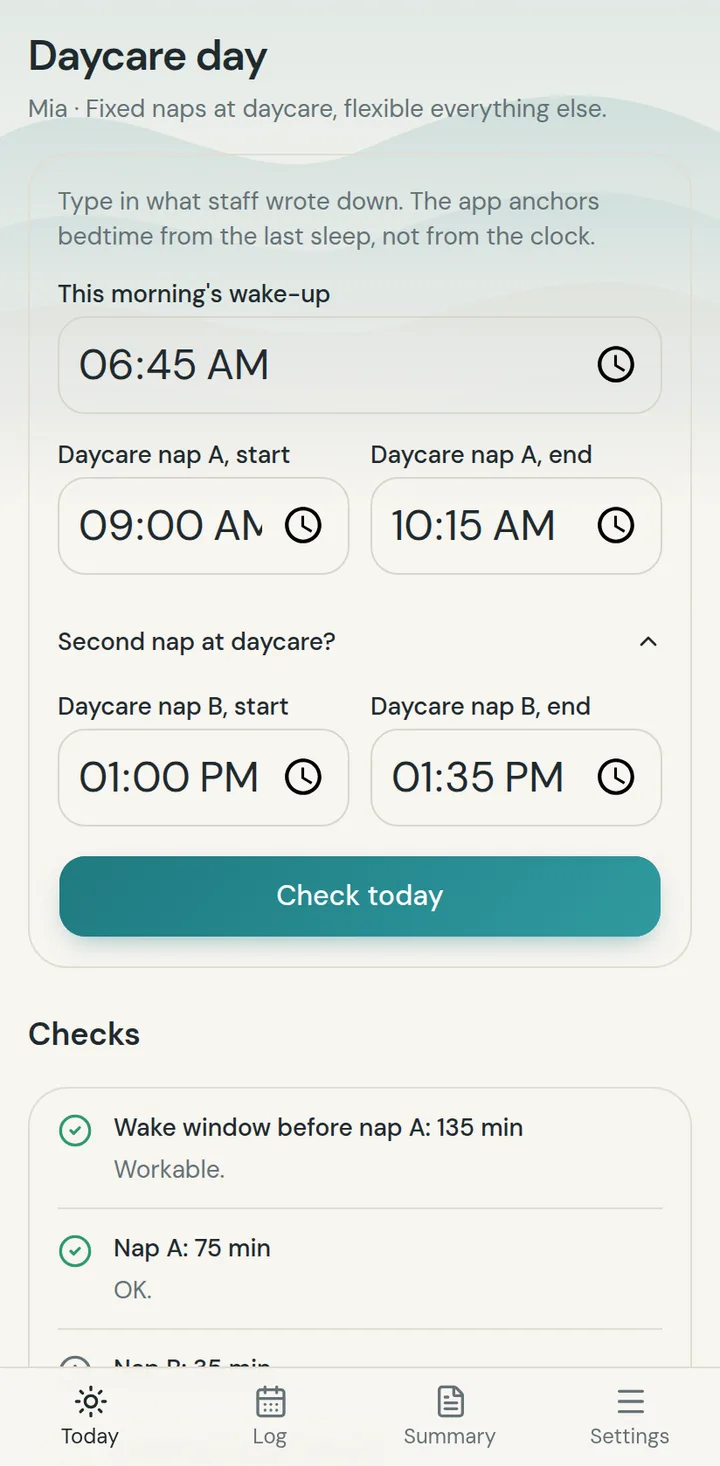
Daycare day: fixed naps in, tonight's bedtime check out.
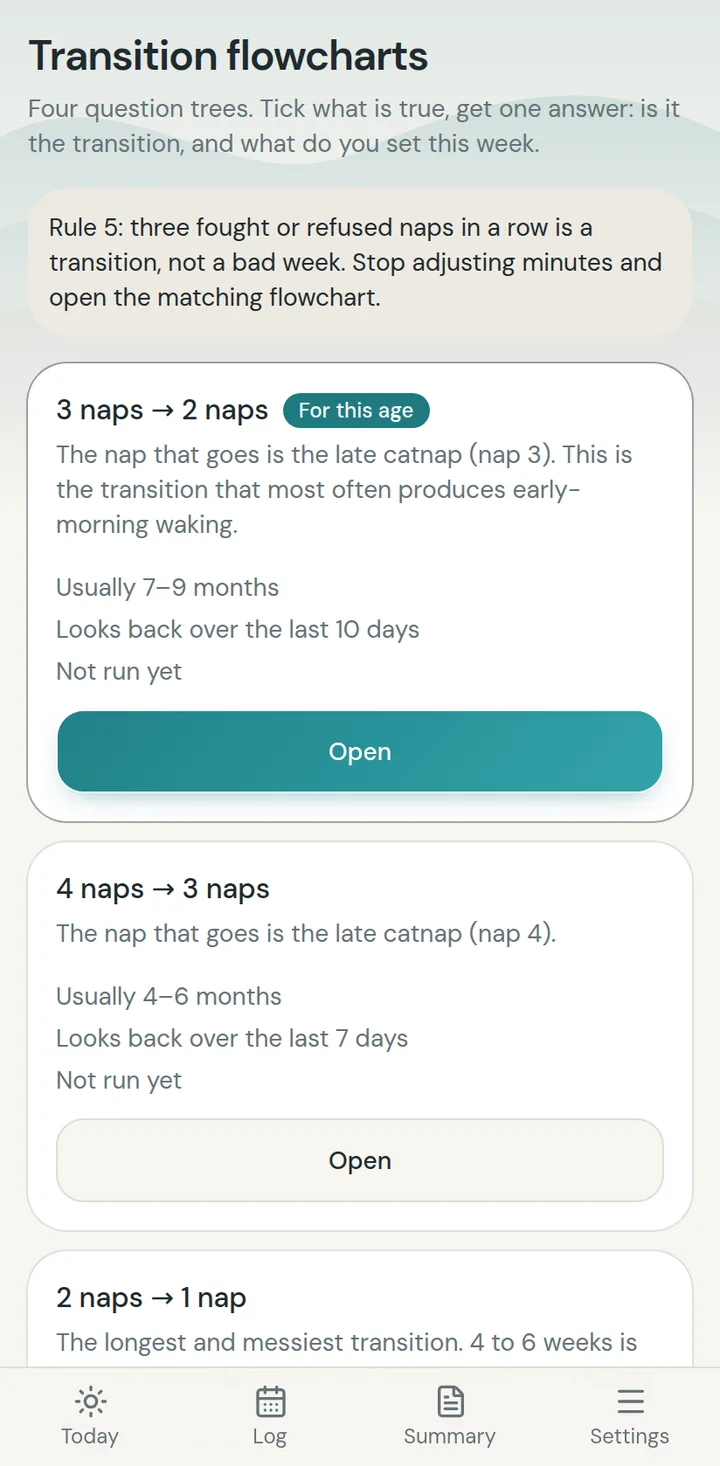
Transition flowcharts: four question trees, one answer.
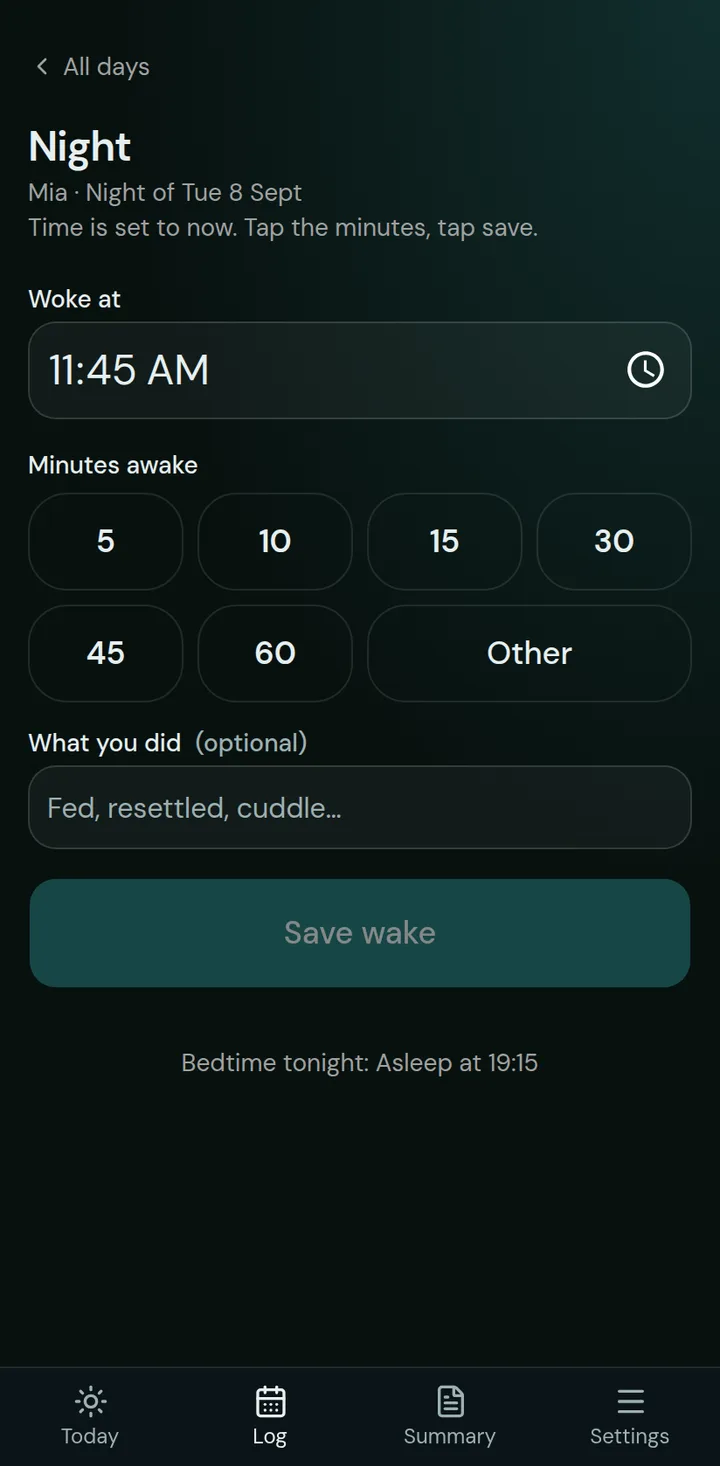
Night screen: log a wake with one hand, always dark.


Pricing
Pay monthly, or pay once and keep it.
The free plan gives you three recalculations a day. Monthly is everything with a cancel button. Rescue and Rescue Plus are one payment, yours until the one-nap day.
Monthly
$9.99
per month, cancel anytime · plus tax
Everything, cancel anytime.
- Unlimited recalculations
- Full nap and night logging
- Twins, daycare days, nap transitions, preterm correction
- Unlimited reports and export
- Partner access
Rescue
$29
one-time, lifetime · plus tax
Pay once. Yours until the one-nap day.
- Unlimited recalculations
- Full nap and night logging
- Unlimited history
- One weekly report
- Partner access
Rescue Plus
Most popular$44
one-time, lifetime · plus tax
Everything in Rescue, plus real life.
- Everything in Rescue
- Twins mode
- Daycare days
- Nap-transition assistant
- Corrected age for preterm babies
- Unlimited reports, export
Clinic Pack $9: an optional add-on at checkout.
3 months of Monthly costs about the same as Rescue. Most parents pick lifetime.
14-day money-back guarantee on lifetime plans. No questions asked.
Not sure yet? The free plan gives you 3 recalculations a day. Start free
FAQ
Questions parents ask before they start
None. Cry-it-out, Ferber, pick-up-put-down, gentle, feeding to sleep, contact naps: NapBay takes no side and works alongside all of them. It only does the arithmetic.
Stop doing wake-window maths at 5am.
Your nap flopped, here's your new bedtime. Enter the wake-up, log the real nap, read the decision. Free to start, any method, 14 days money back.
- Free to start
- Any method: CIO, Ferber, gentle
- Not medical advice. Just the maths.